


The Treyd Wallet is where your funds move, settle, and get paid out. It’s designed to simplify how you receive payouts, pay suppliers, and handle repayments — all in one place.
This article explains what the wallet is, how to use it, and what to expect when managing your funds.
What the wallet is
The Treyd Wallet is a built-in feature within your account that helps you manage your funds in one place.
It’s a multi-currency wallet that you can use to:
- collect receivables payouts
- receive customer payments
- settle your Treyd invoices
- convert between currencies when needed
- withdraw funds to your bank account
Everything is designed to work seamlessly together, so you don’t need to manually move funds between different steps — the wallet takes care of that flow for you.
Collect receivables payouts
When we payout a receivables order to you, funds will be sent directly to your Treyd Wallet.
This allows you to:
- Have full control of your funds
- Settle outstanding invoices with Treyd
- Withdraw to your bank account
Receive customer payments
When we pay out a receivables invoice in advance, your customer will repay the amount directly into your Treyd Wallet. Once the repayment is received, the invoice is settled automatically, and any remaining funds are available for you to use as needed.
Wallet notifications & email updates
To help you stay on top of incoming payments and repayments, we’ll send email updates when funds are received in your Treyd Wallet.
You’ll receive notifications for:
Wallet funded
When funds arrive in your wallet, you’ll get a confirmation email with:
- amount received
- currency
- payer or source
- payment reference
This helps you quickly confirm that funds have arrived and are ready to use.
Customer repayment received & invoice settled
When a customer repayment is identified and automatically matched to a receivables invoice, we’ll send a confirmation email once:
- the repayment has been processed
- the invoice has been settled automatically
- no further action is needed from you
This gives you clear visibility into repayments and automatic settlement activity.
Tip: Automatic settlement only works when the payment details match the invoice information correctly.
Settle your Treyd invoices
Funds in your wallet can be used to settle invoices directly.
Once funds are available:
- Open Invoices
- Select one or multiple invoices
- Click Settle
- Choose Wallet as the payment method
You can settle multiple invoices in a single action for a faster repayment process. Prefer handling invoices one at a time? The original settlement flow is still available.
Repaying via Treyd Wallet gives you a more controlled and transparent way to settle invoices, with faster limit unlocks, simpler reconciliation, and lower payment costs.
New: Convert & Settle
If your available balance is held in a different currency than the invoice you want to repay, you can now convert currency and settle the invoice in a single request.
Instead of creating a conversion request first and then a separate settlement request, Treyd can handle both steps together.
How it works:
- Select the invoice you want to settle
- Choose the wallet currency account you'd like to use
- Review the indicative FX rate
- Submit the request
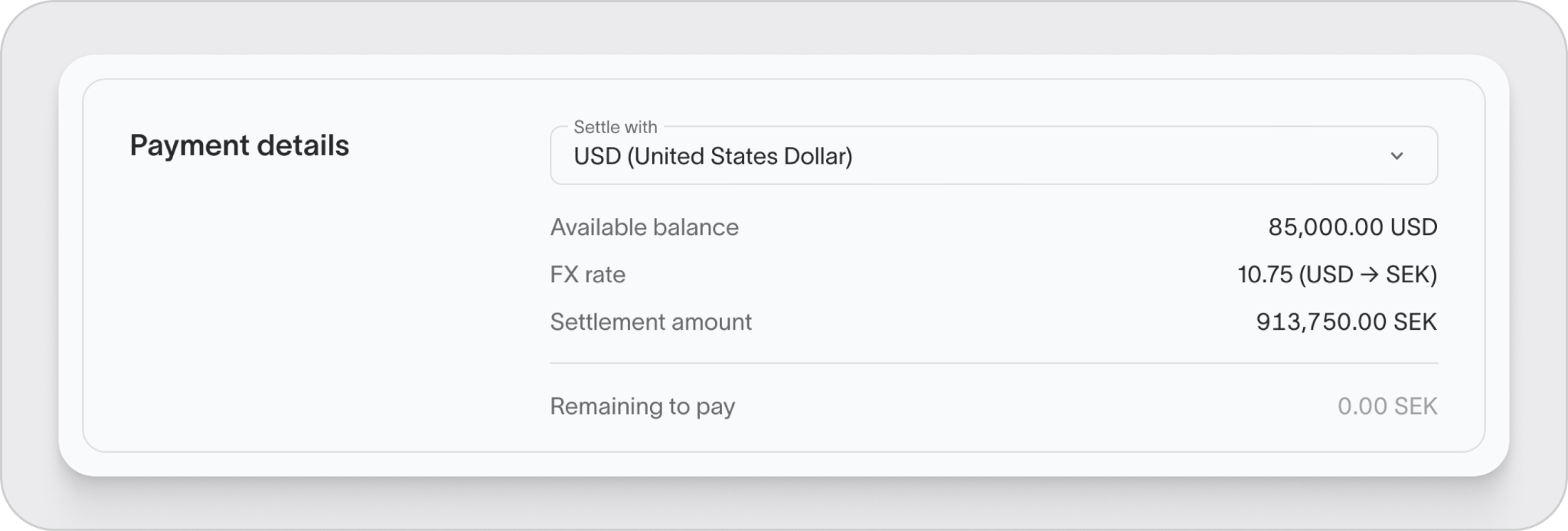
Treyd will process the currency conversion and invoice settlement as part of the same request.
Good to know
The FX rate shown when you submit the request is indicative. The final rate applied may differ slightly when the request is executed.
Convert between currencies
The wallet supports multiple currencies and allows you to convert funds when needed.
You can:
- Convert funds between supported currencies
- Convert currency and settle an invoice in a single request
Before submitting a conversion request, you'll always see:
- The indicative FX rate
- Any applicable fees
- The estimated converted amount
Good to know
FX rates may change between the time a request is submitted and when it is processed.
Withdraw funds to your bank account
You can withdraw funds from your wallet to your bank account at any time.
Timing:
- typically funds will land same day for local transfers
- will vary depending on bank and currency
Automatic settlement
The wallet is designed to reduce manual work.
- funds are automatically applied to the corresponding invoices when the details match
- no need to manually allocate payments
- You can also settle multiple invoices at once if needed.
This helps avoid missed payments and reconciliation issues.
What your accountant should know
For accounting and reconciliation:
- all transactions are visible in one place
- each movement has a clear status (pending, in progress, completed)
- wallet activity maps directly to orders and invoices
This makes it easier to:
- track cash flow
- reconcile balances
- understand fees and FX impacts
What to keep in mind
- some international transactions can take up to a few business days
- FX rates may change until confirmed
- wallet balances may include pending or held amounts
Wrap-up
The Treyd Wallet brings payouts, payments, and repayments into one streamlined flow. It reduces manual steps, improves visibility, and makes reconciliation easier — all in one place.

